
How to add email and Mobile number in postal life insurance without visiting post office

How to add email and mobile number in postal life insurance without visiting post office.

Click to download post info app from google play store


Post info app

After download app register with mobile and email id.


Click on service request
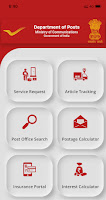


After this select financial Services

Pli online payment(Add email and mobile number)


After successfully registration of email and mobile number in your pli by post office staff.
It will take approximately one week.
You can generate customer id and pay online pli installments.


Comments

Popular posts from this blog

India Post Mobile Banking Android Application

India Post Mobile Banking Android  Application Dear Customer, kindly complete the registration in your nearest post office where your POSB account is present. Once you have completed registration for mobile banking, you can use the services offered  by Department of Post Mobile banking application. Please download latest apk and use activate option for further process.

डाक घर बचत योजनाओं के साथ न्यूनतम रु. 500/- में अपना खाता खोलें I

 डाक घर बचत योजनाओं के साथ न्यूनतम रु. 500/- में अपना खाता खोलें I हम आपके लिए बैंकिंग को सरल और सुलभ बनाते हैं।  Start a savings account with India Post Savings Schemes with minimum Rs. 500/- only. We make banking simple and accessible for you.  #MyPostIndiaPost